Friday, April 11, 2014

An Advanced Predicate and Analysis of How It Works with Trace and Timing

Wagner gives a different version of allodd@x that is more efficient than the one shown here. This function stops testing as soon as it finds a number that is not odd. Contrary to his predisposition, Wagner uses a procedural loop, "de-constructing," as he calls it, the List to operate on its Parts.

In[269]:= allOddProcedural@aList_List:=Module[{i},
For[i=1,i<=Length@aList,i++,If[!OddQ[aList[[i]]],Break[]]];i>Length@aList]

But I bet OddQ is Listable and therefore its C compilation would be much faster than the For loop. First let's compare the Wagner allOddQ from above with his procedural one.

Wagner's function Breaks after OddQ returns False when testing the third argument, 6 (near the end of the Trace). Note the 100-fold difference in Timing!

In[275]:= list2={3,5,6,7};

In[276]:= allOdd@list2//Trace

Out[276]= {{list2,{3,5,6,7}},allOdd[{3,5,6,7}],Length[Select[{3,5,6,7},OddQ]]==Length[{3,5,6,7}],{{Select[{3,5,6,7},OddQ],{OddQ[3],True},{OddQ[5],True},{OddQ[6],False},{OddQ[7],True},{3,5,7}},Length[{3,5,7}],3},{Length[{3,5,6,7}],4},3==4,False}

In[277]:= allOddProcedural@list2//Trace

Out[277]= {{list2,{3,5,6,7}},allOddProcedural[{3,5,6,7}],Module[{i$},For[i$=1,i$<=Length[{3,5,6,7}],i$++,If[!OddQ[{3,5,6,7}[[i$]]],Break[]]];i$>Length[{3,5,6,7}]],{For[i$41099=1,i$41099<=Length[{3,5,6,7}],i$41099++,If[!OddQ[{3,5,6,7}[[i$41099]]],Break[]]];i$41099>Length[{3,5,6,7}],{For[i$41099=1,i$41099<=Length[{3,5,6,7}],i$41099++,If[!OddQ[{3,5,6,7}[[i$41099]]],Break[]]],{i$41099=1,1},{{i$41099,1},{Length[{3,5,6,7}],4},1<=4,True},{{{{{i$41099,1},{3,5,6,7}[[1]],3},OddQ[3],True},!True,False},If[False,Break[]],Null},{i$41099++,{i$41099,1},{i$41099=2,2},1},{{i$41099,2},{Length[{3,5,6,7}],4},2<=4,True},{{{{{i$41099,2},{3,5,6,7}[[2]],5},OddQ[5],True},!True,False},If[False,Break[]],Null},{i$41099++,{i$41099,2},{i$41099=3,3},2},{{i$41099,3},{Length[{3,5,6,7}],4},3<=4,True},{{{{{i$41099,3},{3,5,6,7}[[3]],6},OddQ[6],False},!False,True},If[True,Break[]],Break[]}},{{i$41099,3},{Length[{3,5,6,7}],4},3>4,False},False},False}

In[262]:= list1=Range[1,10^7,2];

Timing[#@list1]&/@{allOddProcedural,allodd}

{{9.297660,True},{0.109201,<<1>>}}

Why Use Built-in Functions? They're Already Written, De-bugged, and Fast

Now let's try my premise - first, OddQ is Listable as I thought.

In[260]:= Attributes@OddQ

Out[260]= {Listable,Protected}

Let's write the simple function:

In[279]:= allOddFunctional@aList_List:=If[!OddQ@aList,i>Length@aList]

In[280]:= Timing[allOddFunctional@list1]

Out[280]= {0.093601,<<1>>}

allOddFunctional is 10X faster than Wagner's procedural function, even though it appears to check every argument:

In[281]:= allOddFunctional@list2//Trace

Out[281]= {{list2,{3,5,6,7}},allOddFunctional[{3,5,6,7}],If[!OddQ[{3,5,6,7}],i>Length[{3,5,6,7}]],{{OddQ[{3,5,6,7}],{OddQ[3],OddQ[5],OddQ[6],OddQ[7]},{OddQ[3],True},{OddQ[5],True},{OddQ[6],False},{OddQ[7],True},{True,True,False,True}},!{True,True,False,True}},If[!{True,True,False,True},i>Length[{3,5,6,7}]]}

The lesson is simply that built-in functions are almost always faster than ones we make if for no other reason than they are compiled into C.

Here Wagner shows the use of While instead of For to stop when it finds an odd number.

allodd@aList_List:=Module[{i=1},While[i<=Length@aList&&OddQ@aList[[i]],i++];i>Length@aList]

Here is a Dropbox link to Wagner's book. High kudos to "Mr Wizard Todd" for asking McGraw-Hill for the right to distribute Wagner's out-of-print book. Here's his post on the StackExchange Mathematica forum.

https://www.dropbox.com/s/kllwg6y44p8va5g/Wagner%20All%20Parts-RC.pdf

Here is a link to a compressed file: http://www.verbeia.com/mathematica/PowerProgMa.zip


More Complex Predicates: allOddQ, allIdenticalQ, subsetQ

"Mr Wizard Todd", Manfred Plagmann, and Sophia Scheibe have done Mathematica users a nice favor by getting permission from McGraw-Hill to distribute licensed copies of David Wagner' s superb book, Power Programming in Mathematica. (Dropbox link: https://www.dropbox.com/s/j2dsyvptnxjd369/Wagner%20All%20Parts-RC.pdf)

A related post is How to See the Equivalence of Select and Cases.

Here are some nice examples of predicates from Wagner (re - written in my Prefix/Postfix dialect).Test a list to see if all of its entries are odd integers.

allOdd@aList_List:=Length@Select[aList,OddQ]==Length@aList

allOdd@{2,3,5,6}

False

allOdd@{3,5,7,9}

True

This predicate tests a List to see if its parts are identical. Count returns all Parts that are Equal to the First Part.

identicalListPartsQ@aList_List:=Count[aList, First@aList] == Length@aList

identicalListPartsQ@{a,b,c,4}

False

identicalListPartsQ@{a,a,a,a}

True

SameQ vs. Equal  and Testing for Lists

SubsetQ determines if its first argument is a subset of its second argument and returns True or False. Wagner's function did not include a List test and he notes on Equal vs.SameQ : "The use of === rather than == makes SubsetQ return False if either set1 or set2 is not a list. Try it with Equal."

I use the Head test: set1_List, which rejects a non-List argument before evaluation. And more importantly, SameQ should always be used to test non-numerical equivalence. In fact using Equal here can give screwy results in part because of its usage as the mathematical "equals" (=) in Mathematica's syntax for equations.

When using abbreviated operators, we should first determine their Precedence:

Precedence/@{Union,Equal,SameQ}

{300.,290.,290.}

Since Union is slightly stickier than SameQ, the Union will be performed before the SameQ test.

subsetQ[set1_,set2_]:=set1∪set2===set2

subsetQ[{a,b,c},{a,b,d}]

False

subsetQ[{a,b},{a,b,2}]

False

Union Sorts Its Result

Whoops! Wagner's function didn't work. Let's find out why:

subsetQ[{a,b},{a,b,2}]//Trace

{subsetQ[{a,b},{a,b,2}],{a,b}∪{a,b,2}==={a,b,2},{{a,b}∪{a,b,2},{2,a,b}},{2,a,b}==={a,b,2},False}

The fact that Union returns a sorted List fouls up the comparison. Let's try a fix with Sort:

Clear@subsetQ;subsetQ[set1_,set2_]:=set1∪set2===Sort@set2

And it works - you see in the last step Sort fixes the order.

subsetQ[{a,b},{a,b,2}]//Trace

{subsetQ[{a,b},{a,b,2}],{a,b}∪{a,b,2}===Sort[{a,b,2}],{{a,b}∪{a,b,2},{2,a,b}},{Sort[{a,b,2}],{2,a,b}},{2,a,b}==={2,a,b},True}

Greater (>) is a "non-Q" predicate so the last statement (lacking a return-suppressing semi-colon), returns True or False.

More on predicates: http://mathematica-guide.blogspot.com/2015/07/how-to-see-equivalence-of-select-and.html

Create Predicates to Test Strings vs Numerics: Test for File Extensions

Elsewhere I tell why predicates are important to use, show how to find all predicates in Mathematica including ones not suffixed with "Q"and create ones of your own to test numerical expressions. Here I cover predicates for testing Strings, and create some tests for file types, as judged by their extensions. Note that FileExtension does not capture the period before the extension.

Equal (==) and SameQ (===) are valid predicates for Strings as well as numerics, and work fine for simple applications.

In[206]:= uncusFileQ@fileName_String := FileExtension@fileName == "unc"

In[207]:= uncusFileQ@"afile.unc"

Out[207]= True

In[208]:= uncusFileQ@"afile.txt"

Out[208]= False

In[209]:= textFileQ@fileName_String := FileExtension@fileName == "txt"

In[215]:= textFileQ@"sampleFile.txt"

Out[215]= True

To test for two alternative file extensions is a little trickier. Since we are testing for String equivalence between String patterns, we use the general String predicate function StringMatchQ and Alternatives (|), not logical Or (||). An example is testing for HTML files, since their extensions come in .htm and .html flavors.

In[210]:= Clear@htmlFileQ;
htmlFileQ@fileName_String := StringMatchQ[FileExtension@fileName, "html" | "htm"]

In[212]:= htmlFileQ@"www.jognog.com/index.html"

Out[212]= True

In[213]:= htmlFileQ@"www.jognog.com/index.htm"

Out[213]= True

In[214]:= htmlFileQ@"www.jognog.com/sitemap.xml"

Out[214]= False


Friday, March 21, 2014

String Processing: Compose Last Name + First Initial and Create Email Address

String Processing: Compose First Name + First Initial and Create Email Addresses

I've imported a List of teacher's names. Now I need to create usernames and email addresses for them to upload to an app. Here is the List; note there are nested Lists within it.

In[226]:= teacherNames={{{"Bazan, Dorothy","Bleakney, Tom"},{"Calorio, Marie","Cardoso, Brian","Carpenito, Courtney","Carton, Jacqueline"},{"Coffey, Tara","Conaty, Thomas"}},{{"Davenport, Joseph","DiSabatino, Jennifer"},{"Doran, Robert","Dsida, Terri"},"Eramo, Paula","Needle, Julie",{"O'Connell, Marisa","O'Neil, Christopher"}}};

The nesting is just going to get in the way so let's remove extra braces with Flatten. Incidentally, you need not hesitate to build up deeply nested Lists in a function and then Flatten them all at once, which is very fast. To keep seeing these names as Strings, we Postfix InputForm to display the quotation marks.

In[227]:= teacherNamesFlattened=Flatten@teacherNames;teacherNamesFlattened//InputForm

Out[227]//InputForm=
{"Bazan, Dorothy", "Bleakney, Tom", "Calorio, Marie", "Cardoso, Brian",
 "Carpenito, Courtney", "Carton, Jacqueline", "Coffey, Tara", "Conaty, Thomas",
 "Davenport, Joseph", "DiSabatino, Jennifer", "Doran, Robert", "Dsida, Terri",
 "Eramo, Paula", "Needle, Julie", "O'Connell, Marisa", "O'Neil, Christopher"}

Let's lose the apostrophes. It's as simple as using a replacement Rule sending apostrophe to no character ("" ' "" -> ""). Without InputForm we don't see the quotation marks, but unless we use ToExpression to convert it, a String remains a String forever.

In[228]:= teacherNamesFlattenedCleaned=StringReplace[teacherNamesFlattened,"'"->""]
Out[228]= {Bazan, Dorothy,Bleakney, Tom,Calorio, Marie,Cardoso, Brian,Carpenito, Courtney,Carton, Jacqueline,Coffey, Tara,Conaty, Thomas,Davenport, Joseph,DiSabatino, Jennifer,Doran, Robert,Dsida, Terri,Eramo, Paula,Needle, Julie,OConnell, Marisa,ONeil, Christopher}

To compose usernames, we'll use a standard format, for instance, lastName + firstInitial. We use StringReplace, which takes one or more replacement Rules as arguments. We construct a pattern using deconstructed pieces of the first and last name. Note that named Blank patterns work in this type of String pattern matching.

Since I'm now going to perform several operations on the source List, for clarity, I will use Postfix with Function syntax and avoid deeply nested, hard-to-read code. The rationale behind this syntax is in A New Mathematica Programming Style Part 2..

This code works, but what is going wrong?

In[229]:= userNames=teacherNamesFlattenedCleaned//StringReplace[#,lastName__<>", "<>firstName__:>lastName<>First@Characters@firstName]&

During evaluation of In[229]:= StringJoin::string: String expected at position 1 in lastName__<>, <>firstName__. >>
During evaluation of In[229]:= StringJoin::string: String expected at position 3 in lastName__<>, <>firstName__. >>

Out[229]= {BazanD,BleakneyT,CalorioM,CardosoB,CarpenitoC,CartonJ,CoffeyT,ConatyT,DavenportJ,DiSabatinoJ,DoranR,DsidaT,EramoP,NeedleJ,OConnellM,ONeilC}

The error is due to using StringJoin ("<>") correctly to compose the deconstructed Strings but incorrectly to deconstruct them with patterns. Using the correct operator, StringExpression ("~~") solves the problem. Also let's convert the usernames to all lower case. Since ToLowerCase is Listable, we don't need to Map it over all the usernames.

In[230]:= userNames=teacherNamesFlattenedCleaned//StringReplace[#,lastName__~~", "~~firstName__:>lastName<>First@Characters@firstName]&//ToLowerCase

Out[230]= {bazand,bleakneyt,caloriom,cardosob,carpenitoc,cartonj,coffeyt,conatyt,davenportj,disabatinoj,doranr,dsidat,eramop,needlej,oconnellm,oneilc}

We can just as easily compose usernames with a reversed form, firstInitial + lastName.

In[231]:= userNames2=teacherNamesFlattenedCleaned//StringReplace[#,lastName__~~", "~~firstName__:>First@Characters@firstName<>lastName]&//ToLowerCase

Out[231]= {dbazan,tbleakney,mcalorio,bcardoso,ccarpenito,jcarton,tcoffey,tconaty,jdavenport,jdisabatino,rdoran,tdsida,peramo,jneedle,moconnell,coneil}

To compose email addresses, in a similar fashion, we'll use a template form, firstName.lastName@schoolDomain.org.

In[232]:= emailAddresses=teacherNamesFlattenedCleaned//StringReplace[#,lastName__~~", "~~firstName__:>firstName<>"."<>lastName<>"@hometownschools.org"]&//ToLowerCase

Out[232]= {dorothy.bazan@hometownschools.org,tom.bleakney@hometownschools.org,marie.calorio@hometownschools.org,brian.cardoso@hometownschools.org,courtney.carpenito@hometownschools.org,jacqueline.carton@hometownschools.org,tara.coffey@hometownschools.org,thomas.conaty@hometownschools.org,joseph.davenport@hometownschools.org,jennifer.disabatino@hometownschools.org,robert.doran@hometownschools.org,terri.dsida@hometownschools.org,paula.eramo@hometownschools.org,julie.needle@hometownschools.org,marisa.oconnell@hometownschools.org,christopher.oneil@hometownschools.org}

Now I'd like to make one List with both username and email address. Here is a typical use of Thread, where using the abbreviated operator for List, instead of Thread[List[userNames2,emailAddresses]] makes the code simple to understand.

In[233]:= namesAndEmails=Thread[{userNames2,emailAddresses}]

Out[233]= {{dbazan,dorothy.bazan@hometownschools.org},{tbleakney,tom.bleakney@hometownschools.org},{mcalorio,marie.calorio@hometownschools.org},{bcardoso,brian.cardoso@hometownschools.org},{ccarpenito,courtney.carpenito@hometownschools.org},{jcarton,jacqueline.carton@hometownschools.org},{tcoffey,tara.coffey@hometownschools.org},{tconaty,thomas.conaty@hometownschools.org},{jdavenport,joseph.davenport@hometownschools.org},{jdisabatino,jennifer.disabatino@hometownschools.org},{rdoran,robert.doran@hometownschools.org},{tdsida,terri.dsida@hometownschools.org},{peramo,paula.eramo@hometownschools.org},{jneedle,julie.needle@hometownschools.org},{moconnell,marisa.oconnell@hometownschools.org},{coneil,christopher.oneil@hometownschools.org}}

Finally I'll Export the List to a file in my Documents directory. It is safest to use FileNameJoin to compose a filename, since it will catch syntax errors as well as make sure it's in the correct format for your operating system.

In[234]:= Export[FileNameJoin@{$UserDocumentsDirectory,"HomeTownUserNames.xlsx"}, namesAndEmails]

Out[234]= C:\Users\kwcarlso\Documents\HomeTownUserNames.xlsx

Sunday, March 9, 2014

Example of a File of Functions to Pre-Load at Startup

Here is a portion of my file of functions that I load on startup so they're available in every session. See also Load Functions at Startup Using Initialization Files.

Functions to Pre-Load


String Processing

Cleaners

trimWhiteSpace::usage="trimWhiteSpace is a simple stringtrim function that does a better job than StringTrim since it removes all WhiteSpaceCharacters from beginning, end or middle of Strings. It is Listable and is intended to Map over all fields in all records where all fields are Strings, no matter if they are wrapped in Lists at any level."

Clear@trimWhiteSpace;
SetAttributes[trimWhiteSpace,Listable];
trimWhiteSpace@stringFile_:=StringReplace[stringFile,WhitespaceCharacter->""];

cleanseText::usage="cleanseText is a moderately thorough stringtrim function. The regular expression removes whitespace characters from the beginning and end of the string, including non-breaking spaces. StringReplace removes apostrophes and commas. It is Listable and intended to automatically Map over all fields in all records where all fields are Strings, no matter if they are wrapped in Lists at any level. These rules should be expanded to include more data cleansing functions as needed."

Clear@cleanseText;
SetAttributes[cleanseText,Listable];
cleanseText@text_String:=StringReplace[text,RegularExpression["^(\\s)*|(\\s)*$"]->""]//StringReplace[#,{"'"->"",WhitespaceCharacter->" ","("|")"->""}]&;

Web Page Functions


Make a URL from a String

makeURL::usage="makeURL takes a String to use as the prefix of the URL, cleans it up (removes whitespace and non-breaking spaces (which are often invisible), puts the String in lower case, replaces single spaces with hyphens and finally appends '.html'. Example: 'My Home Page' -> my-home-page.html".

Clear@makeURL;
SetAttributes[makeURL,Listable];
makeURL@urlName_String:=ToLowerCase@cleanseText@urlName//StringReplace[#,Whitespace->"-"]&//StringReplace[#,"---"->"-"]&//FileNameJoin[{#<>".html"}]&;

Load Functions at Startup Using Initialization Files

See also Example of a File of Functions to Pre-Load at Startup.

When you quit the kernel, Mathematica forgets everything that has happened in a session, such as variable assignments and function definitions. But you can use init.m files to automatically load anything from simple functions, to arbitrarily complex programs, or even external program calls that you want it to know or do on startup. When you accumulate functions that you want to always be available, you can save them in a text file or Package and load them on startup.

There are init.m files in a number of locations—the two intended for user use are in your $UserBaseDirectory /Kernel and /FrontEnd folders. Kernel/init.m will run when you start the Kernel while FrontEnd/init.m will run when you first open a Notebook during a Mathematica session. I recommend using the Kernal init.m since the Front End init.m typically has a lot of stuff in it and since you may Quit the Kernel during a session and want to re-load what's in your init.m file when you re-start it.

First, locate your user init.m files. "Environment variables", which are parameters set for your local environment, i.e. your computer and user account, are one category of $commands. $UserBaseDirectory is for your personal use.

In[1]:= $UserBaseDirectory

Out[1]= "C:\\Users\\kwcarlso\\AppData\\Roaming\\Mathematica"

We can search for any init.m file in this Directory. Note the inclusion of Infinity or the search would leave out sub-directories.

In[2]:= initFiles = FileNames["init.m", $UserBaseDirectory, Infinity]

Out[2]= {"C:\\Users\\kwcarlso\\AppData\\Roaming\\Mathematica\\FrontEnd\\init.m", \
"C:\\Users\\kwcarlso\\AppData\\Roaming\\Mathematica\\Kernel\\init.m"}

Let's take a quick look at the contents of the Kernel init.m using FilePrint, which displays the contents of a text file like a text editor without executing any functions. Here is my init.m files after I modified it. You can see it will Print a Message saying hello and telling me its location, then load some functions that I want available in any Session.

In[3]:= FilePrint@Last@initFiles

(** User Mathematica initialization file **)

Print@"Hello World from your kernel init.m file! I'm located in:\n
C:\\Users\\kwcarlso\\AppData\\Roaming\\Mathematica\\Kernel."

<<"C:\\Users\\kwcarlso\\Dropbox\\Mathematica\\Initialization\\Pre-Load Functions.txt"(** User Mathematica initialization file **)

Print@"Hello World from your kernel init.m file! I'm located in:\n
C:\\Users\\kwcarlso\\AppData\\Roaming\\Mathematica\\Kernel."

<<"C:\\Users\\kwcarlso\\Dropbox\\Mathematica\\Initialization\\Pre-Load Functions.txt"


To set this up similarly for yourself:

  1. Locate your Kernel/init.m file as shown above.
  2. Copy and paste its filepath into your file manager (e.g. Windows Explorer) or otherwise navigate there.
  3. Open the init.m file with a text editor (e.g. Notepad).
  4. Add the Print statement with your init.m location.
  5. Add the filepath to your pre-load functions file.

The easiest way to prepare functions for automatic re-use is to save them in a text file. Two other methods are using Initialization Cells or Packages. Functions stored in a text file or a Package are loaded with Get (<<), which does execute them as it reads them in. Initialization Cells (menu: Cell/Cell Properties/Initialization Cell or /Initialization Group) are the most common method used by beginners.

Saving functions in a text file is a good intermediate step for beginners who aren't ready to create Packages. Just take care to start your function names with small letters so you don't accidentally use the name of a built-in function, and Clear your definitions before defining them.

Clear@functionName; functionName[parameter1_,parameter2_,...]:=definition

Appendix: Locations of All Users' init.m Files


You can execute this cell and see where the initialization directories for all users are located:

In[4]:= {$BaseDirectory,$UserBaseDirectory}//TableForm

Out[4]
C:\ProgramData\Mathematica
C:\Users\kwcarlso\AppData\Roaming\Mathematica

There are four possible init.m files to modify, depending on whether you want to initialize on Kernel or Front End startup, and for all users or just the user who is logged in.


Thursday, October 24, 2013

ListLinePlot with Controls to Improve Plot Readability

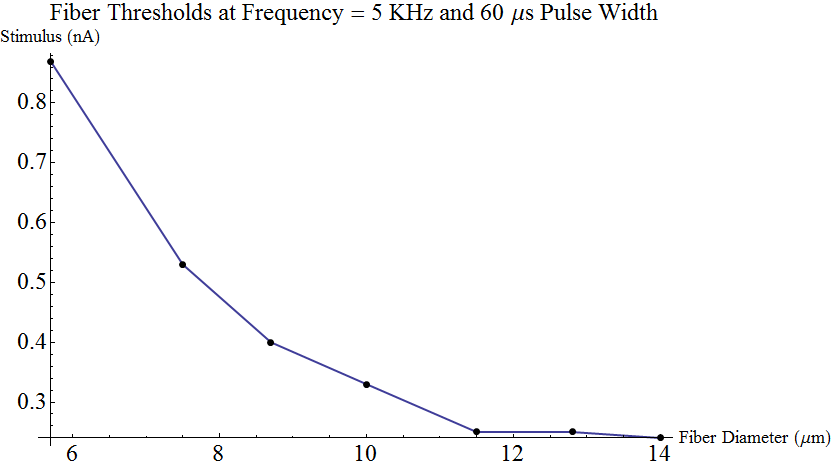
For good readability, as required by a journal, we need to change the look of a ListLinePlot and it can take a bit of fiddling. Here is a template I created that you can use. For publication, the best resolution seems to be given by saving as PDF, but PNG is also good. Although accepted by journals, TIFF doesn't seem to give sufficient resolution (e.g. 600 DPI). To give more separation between the PlotLabel and the y-axis label, add \n at the end of the PlotLabel to insert a newline.

I have shown the code in formal block indented style by inserting line returns after each command, and then Mathematica creates the indents at their proper level. This is a coding best practice. but I typically just leave mine as one continuous stream of commands.

Please note: If you copy and paste this code into your Notebook, the plot will look messed up until you click and drag a corner to expand it to the size you'd see in a journal. You can adjust the controls to work for a smaller size.

This is a plot of axon thresholds by the electrical stimulus strength on their surface that is required to fire them for various diameter axons. The stimulation is in 60 microsecond pulses, 5000 per second. Axons have little repeater stations to keep the signal going and electrical stimulation can trigger these repeaters. These are large- to medium-sized fibers that sense proprioception (muscle position) and fine-touch with a conduction velocity of 30 - 70 m/sec. The overall study is on high frequency stimulation of the spinal cord for pain relief.

ListLinePlot[
  {{5.7,.87},{7.5,.53},{8.7,.40},{10.0,.33},{11.5,.25},{12.8,.25},{14.0,.24}},
  Mesh->Full,
  MeshStyle->PointSize@Large,
  PlotStyle->Thick,
  TicksStyle->Large,
  PlotLabel->Style["Fiber Thresholds at Frequency = 5 KHz and 60 \[Mu]s Pulse Width",Large],
  AxesLabel->{Style["Fiber Diameter (\[Mu]m)",FontSize->18],   Style["Stimulus (nA)",FontSize->18]}
]