Showing posts with label computer programming. Show all posts

Wednesday, May 8, 2013

How to Write a Program in Mathematica: Basic Programming Principles

If you look at the code of the creators of Mathematica's programming language, Stephen Wolfram (e.g. Ch. 5., Cellular Automata, of A New Kind of Science) and Roman Maeder (see his superb books), you will see simplicity and organization. They are master programmers. So if the method of Wolfram and Maeder is to keep things simple and thoughtfully organize their programs, let us follow their example. With that in mind, here are some principles to create any program, step by step.
  1. Write and debug a series of one liners to execute your program. In other words, start by just doing what you want to do "by hand," one line at a time. Then when you're done and it works, assemble the series of one liners into a program.
  2. If the input or output of any step is at all complicated, first solve a toy version. If your entire program is complicated, first solve a toy version of it. Then try each step on the actual problem.
  3. A Functional programming principle is write functions few inputs and outputs as possible–ideally just one output. If you have only one input and one output per function, each is easy to write and debug. Sometimes you have to carry related parameters together. In the function under construction, it's still advisable to have as few parameters affect a single output as possible. 
  4. To assemble the program, first create the shell, i.e. just a Module (or With or Block) with the name of the program function and those of its arguments. Then put each one-liner in the program one at a time, on a separate line, and run the program. 
  5. A Print statement is the simplest form of debugging. So Return or Print the output of any command that you need to see. If you have a long set of arguments or if any are complex, start by just returning the arguments to see if you get what you expected. Leave a Print statement in the program if you need to monitor each output, or if not, delete it. If you think you might need it, comment it out (*Print@variable1."*).
  6. And in general, per the 2000-year old army saying, Clean As You Go (which derives from the law of increasing entropy). Precede your function with Clear@function. Delete things you don't need. Re-organize for clarity. 
  7. There is no shame in clarity. Someone else may need to read your code. And you may be that someone else. As an acquaintance of mine, Gary Drescher, once said, "The 'I' of the future is only loosely coupled to the 'I' of the present." You, 6 months from now, will not have an easy time of deciphering your own code unless you go for clarity. 
  • Use long variable names (like master programmers Hoare and Trott). 
  • Format a cell for text (Alt+7) above your program and comment freely. 
  • Use inline comments (* comment here *) judiciously alongside lines of your code. Too many comments break up the readability.
  • Use the combination of Prefix and Postfix with pure Function that I advocate (here in this blog), which simplifies your code and gives you total control over which functions to emphasize and which to subordinate. 
  1. As you put each one liner in the program, be sure to include any variable names in the local variable List in the Module. If variable names are not listed Mathematica will flag them in a color (blue in my version). You can save space and simplify things by putting assignment functions in the local variable List as long as they're not dependent on a variable that came earlier in the List. If they are dependent, the assignment has to be put in the program body. Put the local variable names in the List in the order that they appear in your program.
  1. Remember the fundamental data structure principles:
  • Write and debug a special function, called a Selector, to extract each subset of what you need from your data. Only use Selectors to touch the data; never touch it directly with the program. When the structure of your data changes, re-write the Selector.
  • Write and debug a special function, called a Constructor, to build each construct from the data. Only use Constructors to build the constructs. Leave the original data alone.
  • If need be, write and debug a special function to export or format the output of your program. Only use the special function to export or format your output.
  • Two other arch-typical data structure functions are constants, that always return the same thing either with no input or no matter what the input, and predicates, that take an input and return True or False.
  1. Whether to define a function in your program, or outside of it and then call it in the program, is a judgment call. A simple but valid answer is if you plan on using the function outside of your program, define it outside to facilitate that usage. But an equally important reason for defining a function outside of your program is to simplify it.
  2. With a medium to large program, consider just throwing out the original version if you see a better approach. At an IEEE seminar on object-oriented programming, the speaker said often you just need to start coding for a bit to get a feel for what you want to do before you can envision a better architectural solution.
Obviously I need to provide examples to illustrate all these principles and will do so.

Tuesday, December 20, 2011

A New Mathematica Programming Style, Part Two


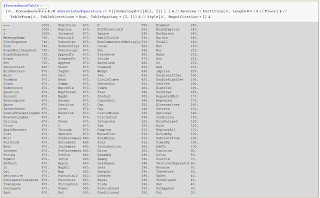
The list of abbreviated operators from which this table was generated is in the previous post (Part One). Now we continue the slides from my 2007 presentation of a new Mathematica dialect.


Suggestions for Wolfram Research
  • Use the Precedence table in documentation instead of Operator Input Forms table
  • Add mouseover Tooltips with Precedence to all abbreviated operators so we can readily see their Precedence
  • Map Tones on to all abbreviated operators' Tooltips, scaled appropriately, so we can mouseover them and hear their Precedence
  • And liberate Tones from CellularAutomata; Tones should permeate Mathematica—Mathematica should sound like R2D2
Questions for Wolfram Research
  • How does PrecedenceForm work?
  • How do the "structural elements," all having Precedence = 670, work?
  • Why not make Comma right-associative with actual Precedence 670 so we can write multiple-argument Prefix functions like this:
f@a,b,c := g@i,j,k

Next: Syntax Problems 3, 4, 5 and 6

Nested matchfix violates various programming good practices

"The guiding principle [of the order of statements of code] is the Principle of Proximity: Keep related actions together."

Manipulate[
 GraphicsRow[{Graphics[Disk[]], Graphics[Disk[]], Graphics[Disk[]]},
  Spacings -> Scaled[i], Frame -> True, Dividers -> All],  {i, .1, 1}]

"If you draw a box around each statement, they should not overlap."

"As a general principle, make the program read from top to bottom rather than jumping around. Experts agree that top-to-bottom order contributes most to readability."

"The Fundamental Theorem of Formatting is that good visual layout shows the logical structure of the program."
-Steve McConnell, Code Complete

'The price paid for functional style programs without excess auxiliary variables is "a large number of brackets."'
  -Michael Trott

Postfix "afterthought" functions can't take arguments, which stymies extended command-line programming

For example, how do you enter options for Plot:

3 Cos[x] + 2 Cos[2 x] + Cos[3 x] //Plot[ ??]

Initiates to functional programming need to learn to think "inside out" or right-to-left

Procedural programmers are often less than thrilled with functional syntax

We would like to write code to emphasize what's important and downplay what's not

Illustration of Matchfix Readability Problems

Compare three versions of a simple function using increasing numbers of optional arguments

Note the violation of the Principle of Proximity

Do boxes drawn around statements overlap?

In example #3, note the code is structured to emphasize whichever expression we wish, in this case, GraphicsRow, not Manipulate, which is just the "wrapper"

Manipulate[GraphicsRow[{Graphics[Disk[]], Graphics[Disk[]], Graphics[Disk[]]},
  Spacings -> Scaled[i], Frame -> True, Dividers -> All],  {i, .1, 1}]

Manipulate[ GraphicsRow[{Graphics[Disk[]], Graphics[Disk[]], Graphics[Disk[]]},
  Spacings -> Scaled[i], Frame -> True, Dividers -> All,
  Alignment -> {Center, Center} , AlignmentPoint -> Center,
  AspectRatio -> Automatic, Axes -> False, AxesLabel -> None,
  AxesOrigin -> Automatic, AxesStyle -> {}, Background -> None,
  BaselinePosition -> Automatic, BaseStyle -> {},
  ColorOutput -> Automatic, ContentSelectable -> Automatic,
  DisplayFunction :> $DisplayFunction, Dividers -> None,
  Epilog -> {}],  {i, .1, 1}]

GraphicsRow[{Graphics@Disk[], Graphics@Disk[], Graphics@Disk[]},
 Spacings -> Scaled@i, Frame -> True, Dividers -> All,
 Alignment -> {Center, Center} , AlignmentPoint -> Center,
 AspectRatio -> Automatic, Axes -> False, AxesLabel -> None,
 AxesOrigin -> Automatic, AxesStyle -> {}, Background -> None,
 BaselinePosition -> Automatic, BaseStyle -> {},
 ColorOutput -> Automatic, ContentSelectable -> Automatic,
 DisplayFunction :> $DisplayFunction, Dividers -> None, Epilog -> {}]
// Manipulate[#,  {i, .1, 1}] &

And the more nested the function, the worse it is


Postfix/Pure Function Style: Functional-Procedural Fusion

A Solution: extended usage of Postfix and pure Function

As an alternative to this 'traditional' usage of matchfix (the error is deliberate):

expr7 [ expr6 [ expr5 [expr4 [expr3 [expr2 [expr1 ] ] ] ] ] ] ]

Consider writing this, using Postfix and pure Function:

expr1 // expr2 # & // expr3 # & // expr4 # & // expr5 # & // expr6 # & // expr7 # &

And you can write it down the page, too:

expr1 //
expr2 # & //
expr3 # & //
expr4 # & //
expr5 # & //
expr6 # & //
expr7 # &

It works as simply as this:

expr1 // expr2 #& is parsed as: expr2[expr1]

Amounts to a fusion of procedural and functional styles

Functional programming that looks procedural

FP Fusion Examples

Command line or one-liner

Sin@x//Plot[#,{x, -5, 5}]&


Extended one-liner or function

This fits the general pattern of a class of functions. You generate some data or intialize a function, then perform a few transformations on it, and then you want to view it.

Here we write it as a readable one-liner, sequentially across the page.

Clear@g; g@x_ := RandomReal[];
Table[g@i, {i, 100}] //Take[#, 80]& //100 #& //#^2& //ListPlot[#, Filling->Axis]&


Or sequentially down the page, nice and clean.

g@x_ := RandomReal[];
Table[g@i, {i, 100}] //
Take[#, 80]& //
100 #& //
#^2& //
ListPlot[#, Filling->Axis]&


If needed, we can use variable assignment within Postfix statements by appropriate parentheses:

Range@6 // (list1 = Partition[#, 3]) &; list1[[1]]

{1, 2, 3}

Summary

Computer programming's destiny is to control high-order complexity

Mathematica is a modern scientific synthesis whose core is the most advanced programming language paradigm

Mathematica's destiny is to play a lead role in the scientific challenges of our age

Version 8 shows its capabilities go far beyond those of any other programming language

Prefix and FP Fusion are a suggested improvement in syntax toward more understandable and controllable programs

Comments and suggestions are welcome: lowlevelfunctionary@kriscarlson.com

Acknowledgements and References

Stephen Wolfram

The Mathematica Book
Code examples in A New Kind of Science

Roman Maeder, harry calkins

A First Course in Mathematica
Programming in Mathematica

Roman Maeder

Programming in Mathematica 2nd Ed.
The Mathematica Programmer
The Mathematica Programmer II
Computer Science with Mathematica

David B. Wagner

Power Programming in Mathematica: The Kernel

John W. Gray

Mastering Mathematica, 2nd Ed.: Programming Methods and Applications

Michael Trott

The Mathematica Guidebook: Programming

Paul R. Wellin, Richard J. Gaylord, and Samuel N. Kamin

An Introduction to Programming with Mathematica, 3rd Ed.

Christian Jacob

Illustrating Evolutionary Computation with Mathematica

Nancy Blachman

Mathematica: A Practical Approach

Stan Wagon

Mathematica in Action

And thanks to the attendees of this talk who had valuable suggestions, in particular Paul Abbott, and their forbearance of my first effort using a Mathematica slide show


Monday, November 28, 2011

A New Mathematica Programming Style, Part One


This is the presentation I gave at the Wolfram User Conference in 2007, updated for version 8. Part Two is here.

A New Mathematica Programming Style, Part One

Kris Carlson

Author, The Way of Mathematica (forthcoming)

An Historical Perspective on Computer Programming

"The computer revolution is a revolution in the way we think and in the way we express what we think. The essence of this change is the emergence of ... procedural epistemology--the study of the structure of knowledge from an imperative point of view, as opposed to the more declarative point of view taken by classical mathematical subjects. Mathematics provides a framework for dealing precisely with notions of 'what is.' Computation provides a framework for dealing precisely with notions of 'how to.'"

Harold Abelson and Gerald Jay Sussman, The Structure and Interpretation of Computer Programs

Origins of Geometry

Beginnings: Accurately surveying land boundaries

Destiny: Euclid's creation of the first axiomatic science

Origins of Computer Programming

Beginnings: Very abstract notions of computation by Church, Turing, Kleene and others

Destiny: The control of complex processes


The Main Challenges of Modern Science

Genetic Engineering

Taking control of the analog computer program immanent in DNA-RNA-protein

Artificial Intelligence

Reverse-engineering the agencies of intelligence created by evolution and creating new ones

Creating and initially controlling intelligences greater than our own

Nanotechnology

Programming at the atomic and molecular level to control materials

These challenges put the Abelson/Sussman thesis in perspective : It' s all about controlling complex processes

What about "A Theory of Everything?"

A misnomer. If created, which I doubt it will be, it would be nothing more than a theory of the currently known physical microcosm

Note that computer programming cannot be derived from it--but it can be derived from computer programming

Mathematica's Place in History

Mathematica is a scientific synthesis like those of Euclid, Spinoza, Newton, Locke, Lagrange, Hamilton, Darwin, Maxwell, Gibbs, Shannon, and others

"Everything is an expression"--a central unifying syntactic principle like energy in physics or bits in information theory

More Elements of the Mathematica Synthesis

General symbol manipulation program

Pattern matching engine

A variety of programming styles and devices

Axiomatization of lower-level functionality (Table, Map* family, Nest* family, etc.)

Interpret and compile modes

Interface/IDE\--the Front End Notebook

Plethora of built-in functions

Extension to all special functions via Mathematica Functions site

Extensive and growing graphics and visualization capabilities

Effectively unlimited notation synthesis

Equation solving

Numerical analysis/evaluation

Axiomatization of higher-level functionality (CellularAutomata, Manipulate, TuringMachine, etc.)

gridMathematica

Documentation Center

MathWorld

Presentation and documentation formats

webMathematica

Demonstrations site

Curated data/Data paclets

Incipient semantic net (WordData)

What is the goal of programming style?

Help manage ever-increasing complexity

Streamline the human-computer interface from both sides

A New Mathematica Programming Style

First principle: Replace all matchfix single argument function applications f [ arg ] with Prefix function applications f @ arg

Requires some knowledge of the 1000-level Precedence table

Second principle: Replace nested matchfix with Postfix + pure Function

Prefix Functional Syntax

Cleaner and more efficient than matchfix

Use prefix function application, @, for single-argument functions

Matchfix style:

f[ g[ h[ i [j] ] ] ]

Prefix style:

f @ g @ h @ i @ j

First two syntactical problems with list- or matchfix-based language

  1. Humans have difficulty parsing deeply nested expressions (>3)
  2. Humans are not regular expression parsers

Basic Benefits of Prefix style

Every pair of brackets we lose makes our expressions easier to read and understand

Every pair of brackets for which we don't have to type or move the cursor saves us time

A Prefix Style Example

Each @ tells us there is no complex nesting for that function, no options or arguments to look for, no brackets to match.


We can focus our attention on the functions that do use matchfix and identify their arguments and options.


There are fewer nested brackets to sort out.


Here's some code from Trott, The Mathematica Guide to Graphics, in matchfix and Prefix styles:

Show[GraphicsArray[
Block[{$DisplayFunction = Identity},
(* display absolute value of 2D Fourier transform *)
ListDensityPlot[Abs[Fourier[Table[1/#[i, j], {i, 256}, {j, 256}]]],
Mesh -> False, ColorFunction -> (Hue[0.8 #]&)]& /@
{GCD, LCM}]]]

Show@GraphicsArray@
Block[{$DisplayFunction = Identity},
(* display absolute value of 2D Fourier transform *)
ListDensityPlot[
Abs@Fourier@Table[1/#[i, j], {i, 256}, {j, 256}],
Mesh -> False, ColorFunction -> (Hue[0.8 #]&)]& /@
{GCD, LCM}]

More Prefix Style Examples

Basic Usages

One argument function definitions:

f[x_] := Sin[x]

f@x_ := Sin@x

One argument functions or assignments:

Log@100^100//N

2.11139*10^66

walk1D3@n_:= NestList[#+Random[Real,{-1,1}]&, Random[Real, {-1,1}],n];

walk1D3@10

{-0.206019, -0.914893, -0.951759, -1.04967, -0.299963, -0.8917, -0.147434, 0.764746, 1.57289, 1.40045, 2.13796}

list5 = Range@10;

Clear@list5;

Histogram@%

Histogram[Null]

Needs@"Combinatorica`"

Multiple one-argument function composition:

f@g@h@i@j@k

Sin[g[h[i[j[k]]]]]

First@Rest@Most@Range@10

Function definitions with lists as argument:

f@{a_, b_, c_}:= n@{a,b,c}

Precedence in Mathematica

The main objection to Prefix is that you have to know operator precedence

However this objection applies to all abbreviated operators (+, *, ^, [[ ]], { }, /@, etc.)

Mathematica is endowed with "a variety of special characters that greatly increase readability and elegance."

FORTRAN (FORmula TRANslation; early and primitive, but elegant), Mathematica (an advanced synthesis):

A conscious effort was made to provide a path of least action or smooth transduction from mathematical notation to code

Further, a significant feature of V6 is the addition of 100 undefined operators to facilitate creating user-defined notations

I submit that if you use Prefix, you will use it more often than the most common abbreviated operators

Precedence directs the order of abbreviated operators' operation

Precedence can be symbolized by parenthetical grouping, such as: a + (b ^ c) versus (a + b) ^ c

The Mathematica reference on precedence in 5.2 was Table A.2.7, now is in tutorial / InputSyntax: Operator Input Forms

It lists all abbreviated operators in tables of decreasing precedence

However, a superior reference can be generated from a little code

There exists an undocumented function, Precedence

Voila:

Precedence@Prefix

640.

It is not Listable, but it should be! Either reset Attributes to Listable or just Map it:

Precedence /@ {Prefix, Factorial}

{640., 610.}

What happened in the previous slide?
Prefix is a little "stickier" than Factorial==@ sticks to n more than ! does--and so we got (IntegerDigits@n)! instead of IntegerDigits[ n! ]

When faced with a few abbreviated operators, map Precedence onto them in the order they present in your expression

a + b * c ^ d - e

Precedence /@ {Plus, Times, Minus, Power}

{310., 400., 480., 590.}

Precedence mnemonics: Think of operator "stickiness" or "binding strength"

Mathematica's 1000 - Level Precedence Table

Abbreviated Operators

This list includes all nondefined operators as of v8.0, about an increase of 60 more over v6.0. I include a few of a group of syntax operators that have Precedence = 670, such as Parentheses, Comma, and Subscript. These are which are referred to in the documentation as "structural operators."

abbreviatedOperators = {Operate, Through, Pi, I, Unset, Plus, N, Infinity, Tilde, Backtick, Level, Position, Alternatives, Repeated, RepeatedNull, Condition, Except, AddTo, PreIncrement, Increment, Decrement, PreDecrement, Map, MapAll, MapAt, MapThread, Apply, Factorial, Factorial2, Prefix, Postfix, Infix, MatchFix, Comma, Head, Part, PatternTest, Power, Function, Set, SetDelayed, Rule, RuleDelayed, TagSet, UpSet, Unset, Put, PutAppend, Append, PrependTo, AppendTo, Get, Overscript, Underscript, Subscript, Sum, Product, Coproduct, PartialD, DifferentialD, Integral, Cap, Cup, TimesBy, Replace, ReplaceAll, Colon, SemiColon, CompoundExpression, Therefore, Because, And, Or, Not, Element, ForAll, Exists, NotExists, Xor, Nand, Nor, SuchThat, Implies, RoundImplies, RightTee, LeftTee, DoubleRightTee, DoubleLeftTee, VerticalSeparator, Union, Intersection, Vee, Wedge, Backslash, Divide, PlusMinus, MinusPlus, CirclePlus, CircleMinus, Times, CircleTimes, CenterDot, Diamond, Star, NonCommutativeMultiply, Cross, Dot, D, Del, Square, SmallCircle, Integrate, Sqrt, Conjugate, Transpose, ConjugateTranspose, Derivative, StringJoin, Slot, SlotSequence, Out, In, Blank, BlankSequence, BlankNullSequence, Optional, Pattern, Default, MessageName, Piecewise, Symbol, String, Integer, Real, Complex, FullForm, Null, List, AngleBracket, Floor, Ceiling, BracketingBar, DoubleBracketingBar, Parentheses, Quote, DoubleQuote, Percent, SubtractFrom, DivideBy, Equal, Greater, Unequal, Less, LessEqual, SameQ, UnsameQ, Question, Underscore, Slash, FormBox, Hold, HoldPattern, "=*=", Conditioned, Distributed};

Length@abbreviatedOperators

165

After defining the table of Abbreviated Operators, this code generates the first formatted table that you see at the top of this post, listing them in descending order of Precedence.


$PrecedenceTable = {#, Precedence@#} & /@abbreviatedOperators // #[[Ordering@#[[All, 2]] ] ] & //Reverse // Partition[#, Length@#/4 // Floor] & //TableForm[#, TableDirections -> Row, TableSpacing -> {3, 1}] & //Style[#, Magnification -> 1] &

And this code generates the second formatted table that you see at the top of the next post, listing Abbreviated Operators alphabetically.

$PrecedenceTable = {#, Precedence@#} &/@ abbreviatedOperators // #[[Ordering@#[[All, 1]] ] ] & //Partition[#, Length@#/4 // Floor] & //TableForm[#, TableDirections -> Row, TableSpacing -> {3, 1}] & //Style[#, Magnification -> 1] &