Computing the Mandelbrot set is a classic example of the need to Compile a Mathematica function (see Ruskeepää, p. 451). You just need to get the syntax right for a successful Compile. Below, the first argument is the parameter, c, and its type, Complex. The entire Module is the second argument, the expression to be compiled. Definitely try this at home!
Clear@mandelbrot;mandelbrot=Compile[{{c,_Complex}},Module[{z=0+0I,n=0},While [Abs@z<2&&n<50,z=z^2+c;n++];n ] ]
CompiledFunction[Argument count: 1
Argument types: {_Complex}
The CompiledFunction can be applied to individual numbers. The criteria for inclusion in the Mandelbrot set is, after a limited number of iterations of z = z^2 + c (in this case 50), is its absolute value less than a given number (in this case 2). The absolute value of a complex number is its Euclidean distance from the origin. If the absolute value of a number exceeds 2 before 50 iterations, e.g. 4, it is excluded.
mandelbrot[0.2+I]
4
mandelbrot[0.2+0.2I]
50
Let's do some heavy-duty computing. As a precaution we'll increase the RAM allocated to Mathematica.
Needs@"JLink`";
ReinstallJava[JVMArguments->"-Xmx6000m"]
LinkObject[[]
Start with a couple of individual plots. I use ImageSize->Full so when you do this yourself a large image will automatically be generated. On my Dell Optiplex 900 these take 2.68 seconds each.
Timing[DensityPlot[mandelbrot[x+I y],{x,-2,1},{y,-1.5,1.5},ColorFunction->Hue,PlotPoints->200,Mesh->False,ImageSize->Full,FrameTicks->{{-2,-1,0,1},{-1,0,1}}]]//Column
 Timing[DensityPlot[mandelbrot[x+I y],{x,-2,1},{y,-1.5,1.5},ColorFunction->"Rainbow",PlotPoints->200,Mesh->False,ImageSize->Full,FrameTicks->{{-2,-1,0,1},{-1,0,1}}]]//Column
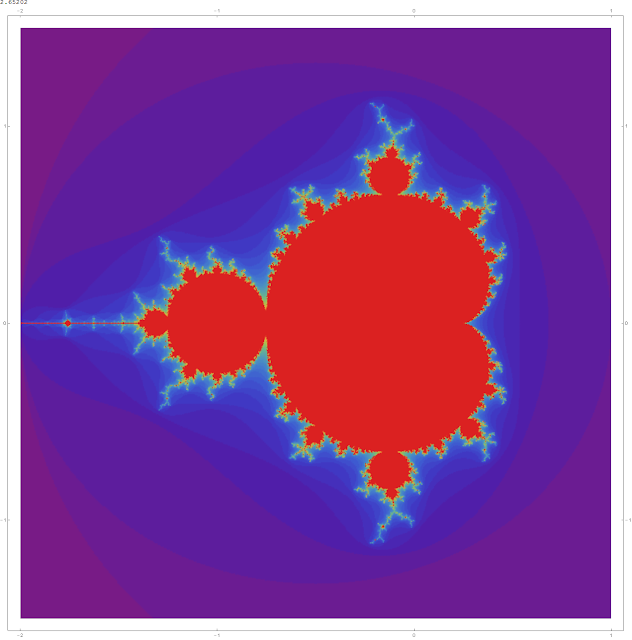 I'm kind of curious about all the built-in ColorFunctions. Let's plot Mandelbrot sets using each of them. Here they are. I reverse the order since I like some of the ones at the end best.
colorFunctions=ColorData@"Gradients"
{AlpineColors,Aquamarine,ArmyColors,AtlanticColors,AuroraColors,AvocadoColors,BeachColors,BlueGreenYellow,BrassTones,BrightBands,BrownCyanTones,CandyColors,CherryTones,CMYKColors,CoffeeTones,DarkBands,DarkRainbow,DarkTerrain,DeepSeaColors,FallColors,FruitPunchColors,FuchsiaTones,GrayTones,GrayYellowTones,GreenBrownTerrain,GreenPinkTones,IslandColors,LakeColors,LightTemperatureMap,LightTerrain,MintColors,NeonColors,Pastel,PearlColors,PigeonTones,PlumColors,Rainbow,RedBlueTones,RedGreenSplit,RoseColors,RustTones,SandyTerrain,SiennaTones,SolarColors,SouthwestColors,StarryNightColors,SunsetColors,TemperatureMap,ThermometerColors,ValentineTones,WatermelonColors}
Length@colorFunctions
51
I'll make a Grid of them that will correspond to the Grid of the plots themselves so we can easily look up the ColorFunction of one we like by finding its name in the corresponding place in the Grid. Although each row will have 3 plots and 3 divides 51 evenly, by habit I use the syntax for Partition that would not drop an overhang of a ragged List (the empty List {} in the position of the padding argument).
Reverse@colorFunctions//Partition[#,3,3,1,{}]&//Grid

The iterator, predefined, in this Table iterates over all the ColorFunctions. Note you do not need to use the cumbersome {i, Length@colorFunctions} requiring the iterator to be a number.
Table[DensityPlot[mandelbrot[x+I y],{x,-2,1},{y,-1.5,1.5},ColorFunction->predefined,PlotPoints->200,Mesh->False,FrameTicks->{{-2,-1,0,1},{-1,0,1}},ImageSize->Medium],{predefined,Reverse@colorFunctions}]//Partition[#,3,3,1,{}]&//Grid

Recommended:
Clear@mandelbrot;mandelbrot=Compile[{{c,_Complex}},Module[{z=0+0I,n=0},While [Abs@z<2&&n<50,z=z^2+c;n++];n ] ]
CompiledFunction[Argument count: 1
Argument types: {_Complex}
The CompiledFunction can be applied to individual numbers. The criteria for inclusion in the Mandelbrot set is, after a limited number of iterations of z = z^2 + c (in this case 50), is its absolute value less than a given number (in this case 2). The absolute value of a complex number is its Euclidean distance from the origin. If the absolute value of a number exceeds 2 before 50 iterations, e.g. 4, it is excluded.
mandelbrot[0.2+I]
4
mandelbrot[0.2+0.2I]
50
Let's do some heavy-duty computing. As a precaution we'll increase the RAM allocated to Mathematica.
Needs@"JLink`";
ReinstallJava[JVMArguments->"-Xmx6000m"]
LinkObject[[]
Start with a couple of individual plots. I use ImageSize->Full so when you do this yourself a large image will automatically be generated. On my Dell Optiplex 900 these take 2.68 seconds each.
Timing[DensityPlot[mandelbrot[x+I y],{x,-2,1},{y,-1.5,1.5},ColorFunction->Hue,PlotPoints->200,Mesh->False,ImageSize->Full,FrameTicks->{{-2,-1,0,1},{-1,0,1}}]]//Column


colorFunctions=ColorData@"Gradients"
{AlpineColors,Aquamarine,ArmyColors,AtlanticColors,AuroraColors,AvocadoColors,BeachColors,BlueGreenYellow,BrassTones,BrightBands,BrownCyanTones,CandyColors,CherryTones,CMYKColors,CoffeeTones,DarkBands,DarkRainbow,DarkTerrain,DeepSeaColors,FallColors,FruitPunchColors,FuchsiaTones,GrayTones,GrayYellowTones,GreenBrownTerrain,GreenPinkTones,IslandColors,LakeColors,LightTemperatureMap,LightTerrain,MintColors,NeonColors,Pastel,PearlColors,PigeonTones,PlumColors,Rainbow,RedBlueTones,RedGreenSplit,RoseColors,RustTones,SandyTerrain,SiennaTones,SolarColors,SouthwestColors,StarryNightColors,SunsetColors,TemperatureMap,ThermometerColors,ValentineTones,WatermelonColors}
Length@colorFunctions
51
I'll make a Grid of them that will correspond to the Grid of the plots themselves so we can easily look up the ColorFunction of one we like by finding its name in the corresponding place in the Grid. Although each row will have 3 plots and 3 divides 51 evenly, by habit I use the syntax for Partition that would not drop an overhang of a ragged List (the empty List {} in the position of the padding argument).
Reverse@colorFunctions//Partition[#,3,3,1,{}]&//Grid
The iterator, predefined, in this Table iterates over all the ColorFunctions. Note you do not need to use the cumbersome {i, Length@colorFunctions} requiring the iterator to be a number.
Table[DensityPlot[mandelbrot[x+I y],{x,-2,1},{y,-1.5,1.5},ColorFunction->predefined,PlotPoints->200,Mesh->False,FrameTicks->{{-2,-1,0,1},{-1,0,1}},ImageSize->Medium],{predefined,Reverse@colorFunctions}]//Partition[#,3,3,1,{}]&//Grid
Recommended:


